


One club experience, on every screen.
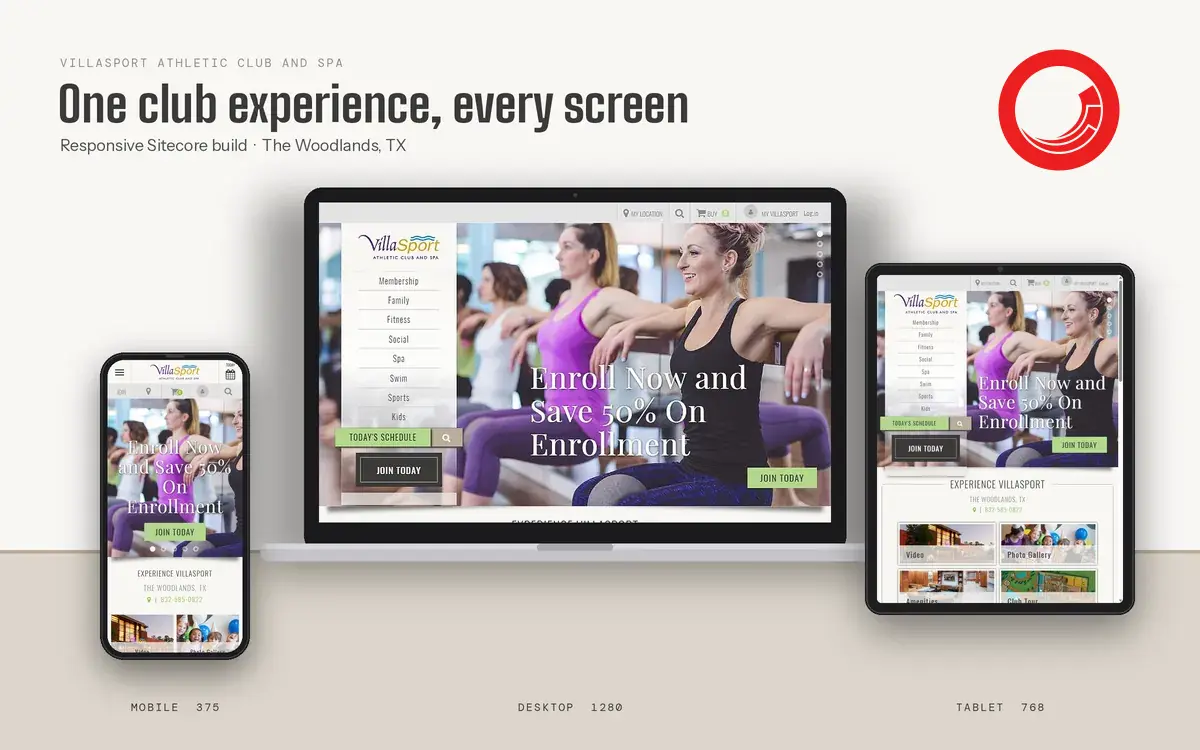
VillaSport runs athletic clubs and spas, and every club needs its own home page, its own dues and its own class schedule. We built a responsive Sitecore site for The Woodlands, Texas, that sells memberships, shows the day’s schedule and makes joining as simple as a few questions at the front desk.
- PLATFORM
- Responsive Sitecore build, location-aware content, connected to membership, scheduling and payments
- SCOPE
- Club home pages, membership calculator, program pages, today’s schedule, online joining
- SCREENS
- Desktop 1280, tablet 768, mobile 375
CHAPTER 01 OF 03
From first visit to first class
Follow a prospect from a club’s home page to a booked spot in a class, the way they would be walked through it at the front desk.
01 / 04 · ARRIVECLUB HOME PAGE
A club home page that sells and serves
Every location gets its own home page. The fixed left rail keeps the eight program areas, Today’s Schedule and Join Today in reach, a utility bar handles the location switcher, search, cart and member login, and content tiles for video, photo gallery, amenities and the club tour invite prospects to look around.
- PROGRAM RAIL
- UTILITY BAR
- CONTENT TILES
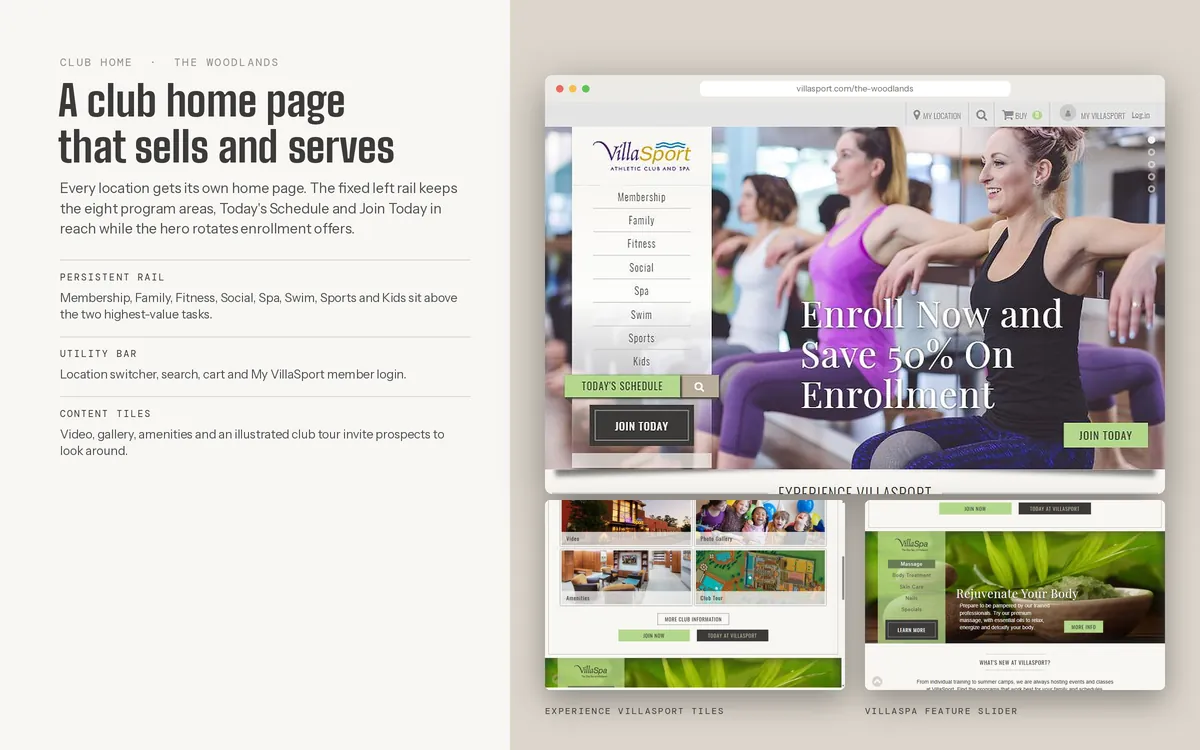
FIG. 04 — A CLUB HOME PAGE THAT SELLS AND SERVES 02 / 04 · PRICE ITMEMBERSHIP
Dues you can calculate yourself
Prospects choose the number of adults, the number of children and the payment type, then see the monthly dues and enrollment fee before they speak to sales. The calculator reads live rates for each club, so The Woodlands shows its own offer, and results carry straight into online enrollment and the cart.
- DUES CALCULATOR
- CLUB-SPECIFIC PRICING
- INTO CHECKOUT
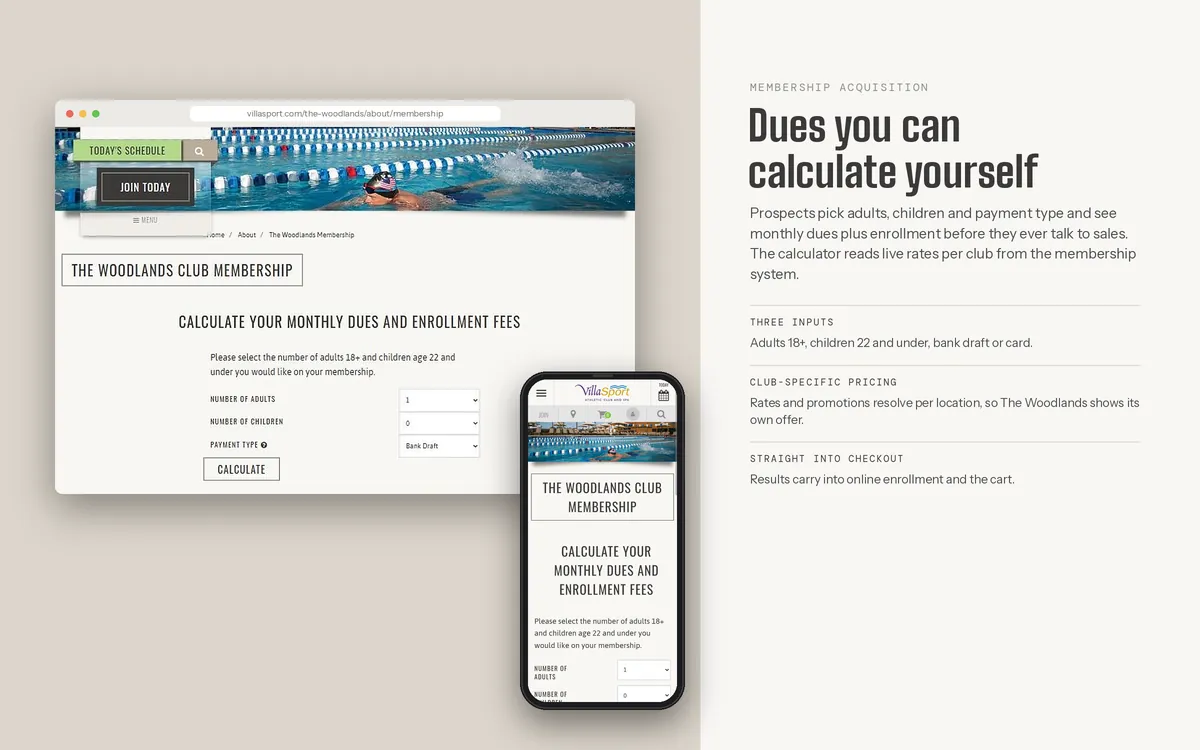
FIG. 05 — DUES YOU CAN CALCULATE YOURSELF 03 / 04 · JOINWIREFRAME · MEMBERSHIP
Joining online in four steps
The online join flow is mapped from the clubs’ in-person sales process. Pricing appears first, so prospects arrive at the desk or the checkout already knowing what they will pay. Step one asks the same three questions as the front desk. Step two shows the rate for the chosen club. Step three adds household members in one pass. Step four asks the member to accept the agreement before any payment is taken.
- FOUR STEPS
- HOUSEHOLDS
- CLEAR AGREEMENT
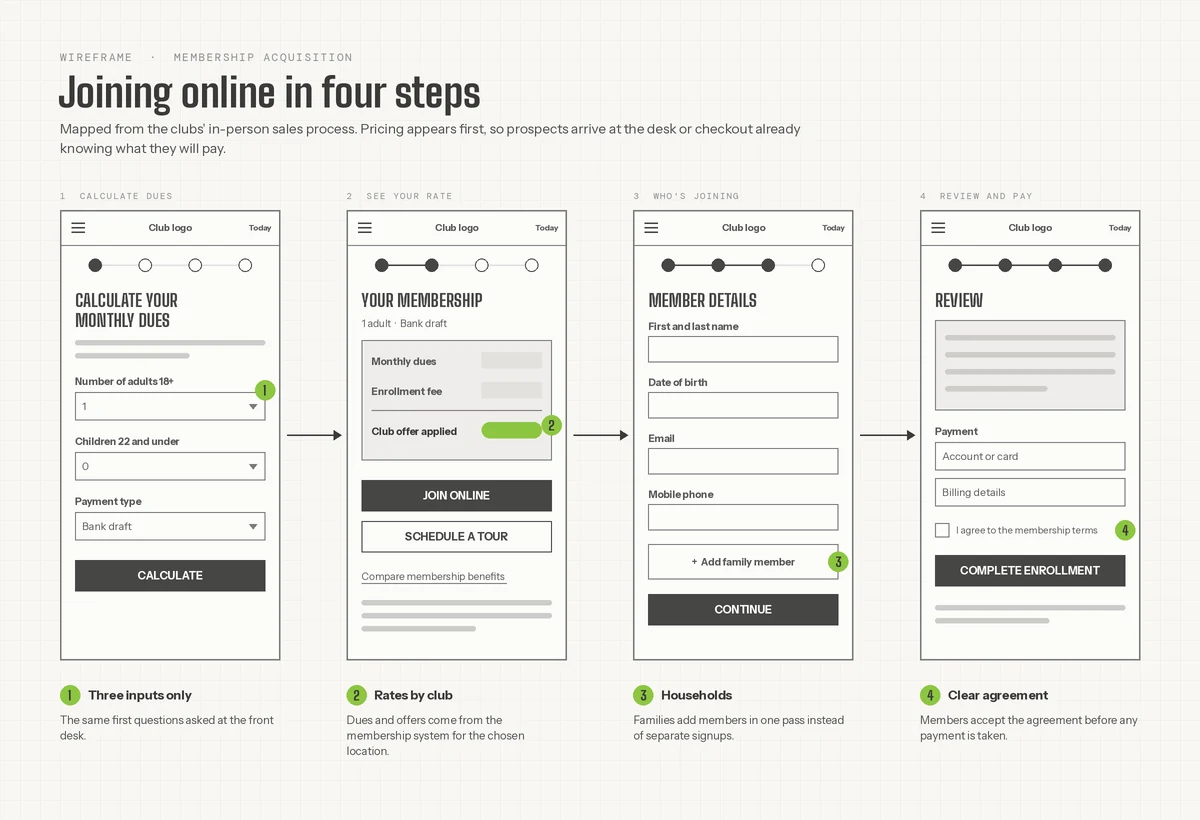
FIG. 11 — JOINING ONLINE IN FOUR STEPS 04 / 04 · BOOKWIREFRAME · CLASS REGISTRATION
From today’s schedule to a booked spot
Classes, pool times and club events come from outside scheduling and registration services, and the page filters them for one club. A day strip and filters narrow the list, the spots left decide whether a member sees Register or Join waitlist, and member pricing appears once they sign in. Classes and events check out in the same cart.
- SCHEDULE
- WAITLIST
- SHARED CART
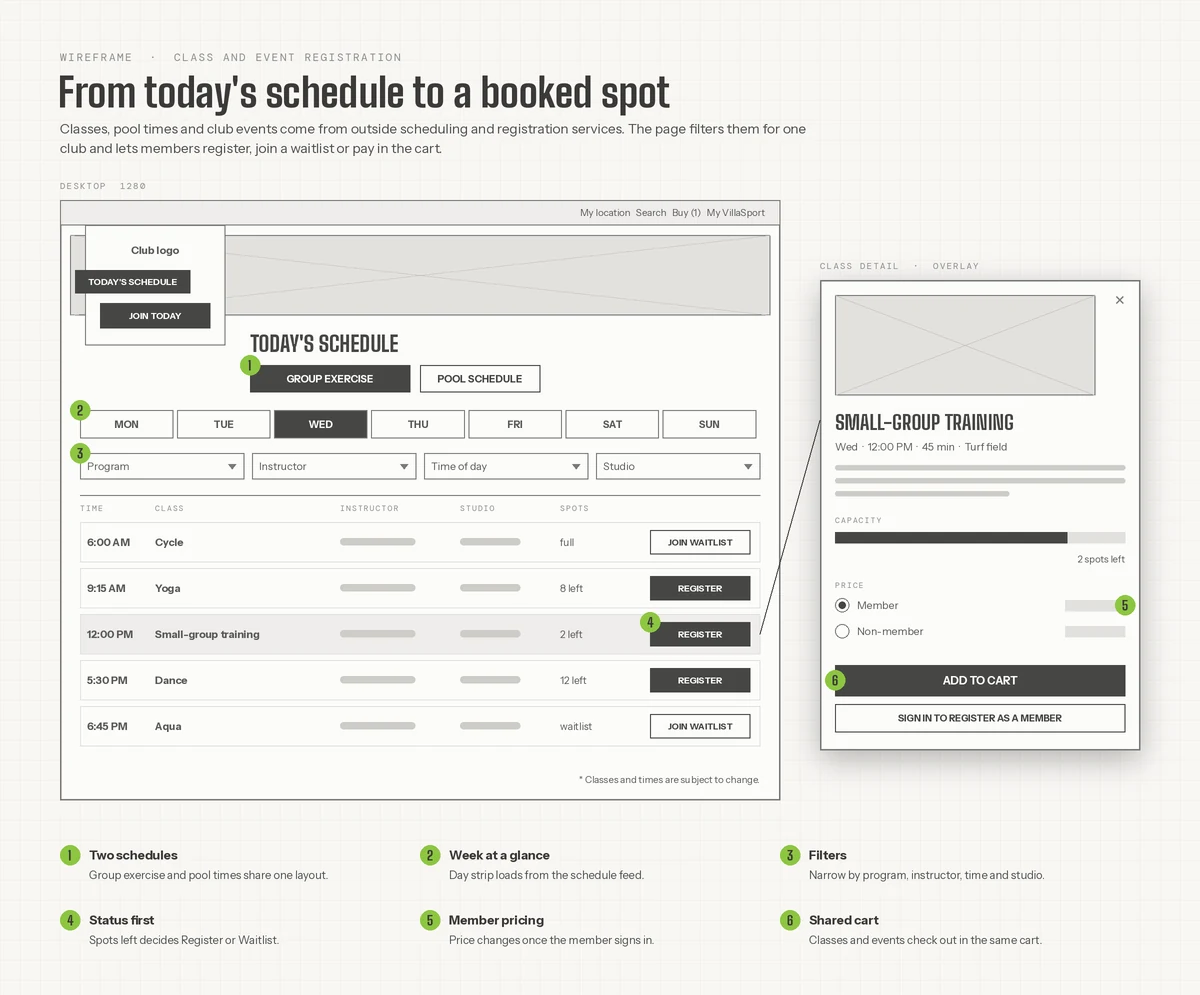
FIG. 12 — FROM TODAY’S SCHEDULE TO A BOOKED SPOT
CHAPTER 02 OF 03
The rail, on every screen
The program rail keeps Join Today and Today’s Schedule within reach, from a 1280px desktop to a phone.
06 · PROGRAM PAGES
Interior pages with a collapsible rail
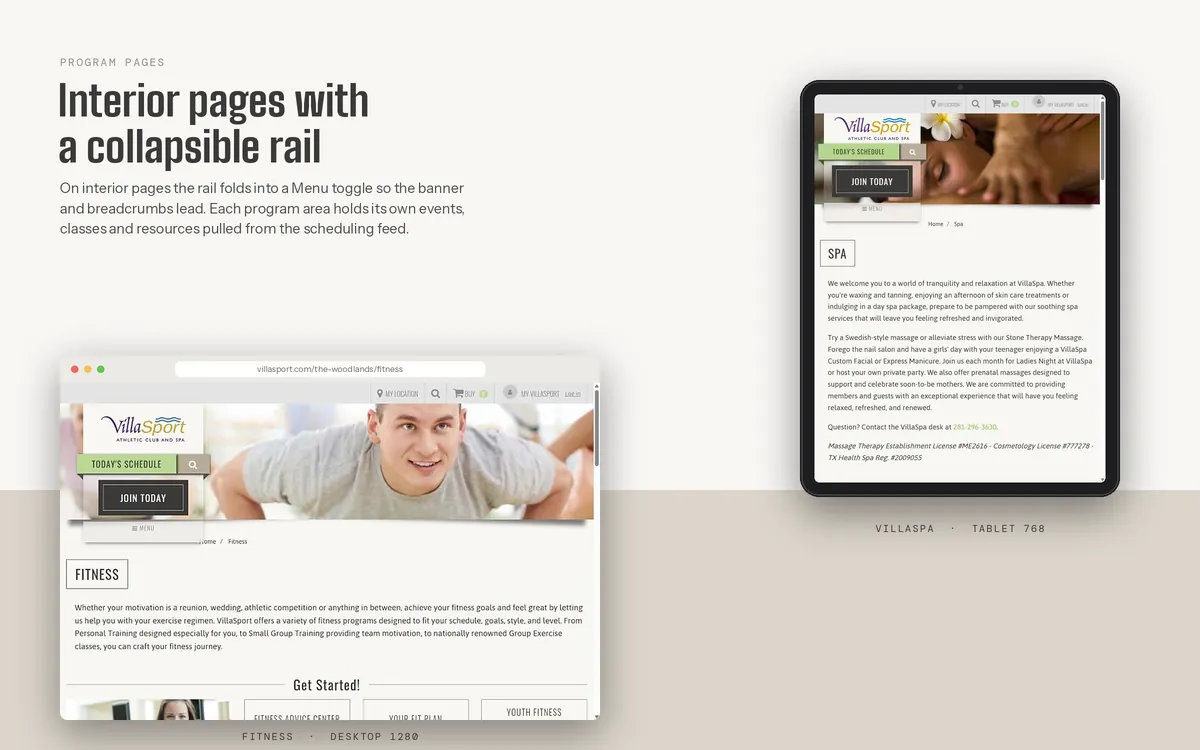
On interior pages the rail folds into a Menu toggle, so the banner and breadcrumbs lead. The fitness page offers advice, a fit plan and youth fitness up front, and the spa page sets out massage, skin care, nails and special treatments, with each program area’s events and classes pulled from the scheduling feed.
- FITNESS
- SPA
- COLLAPSIBLE RAIL
01 · RESPONSIVE VIEWS
One club experience, every screen
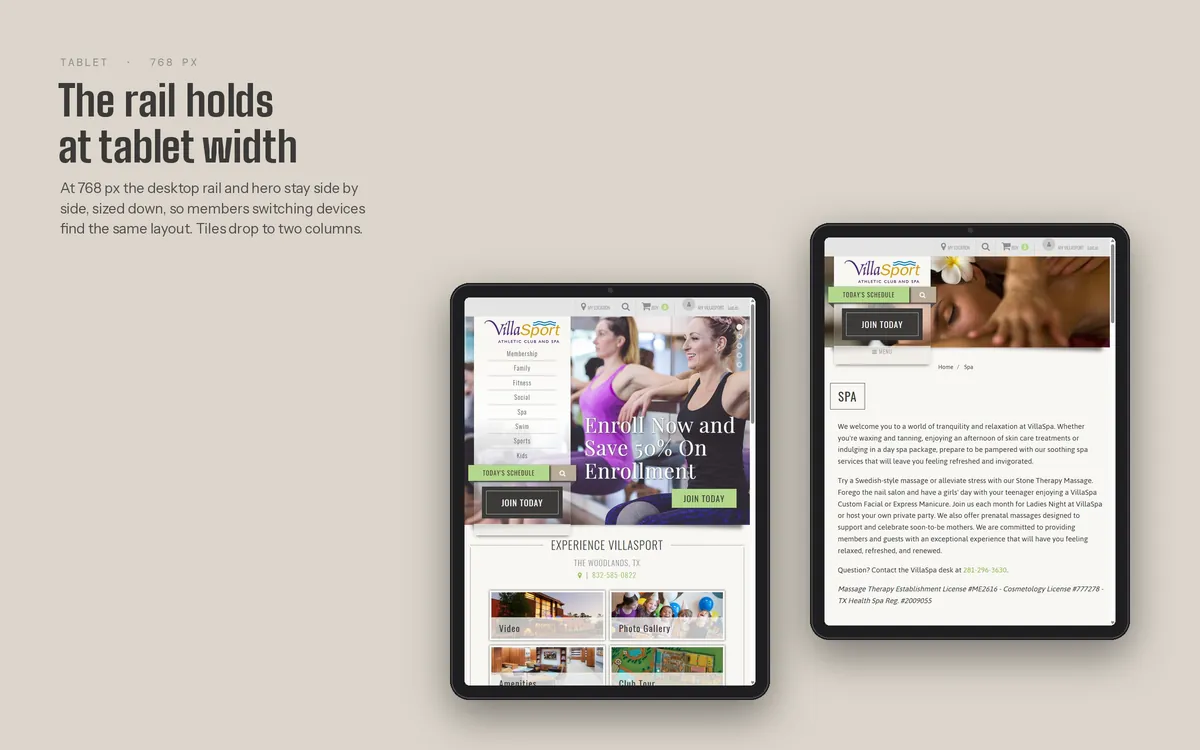
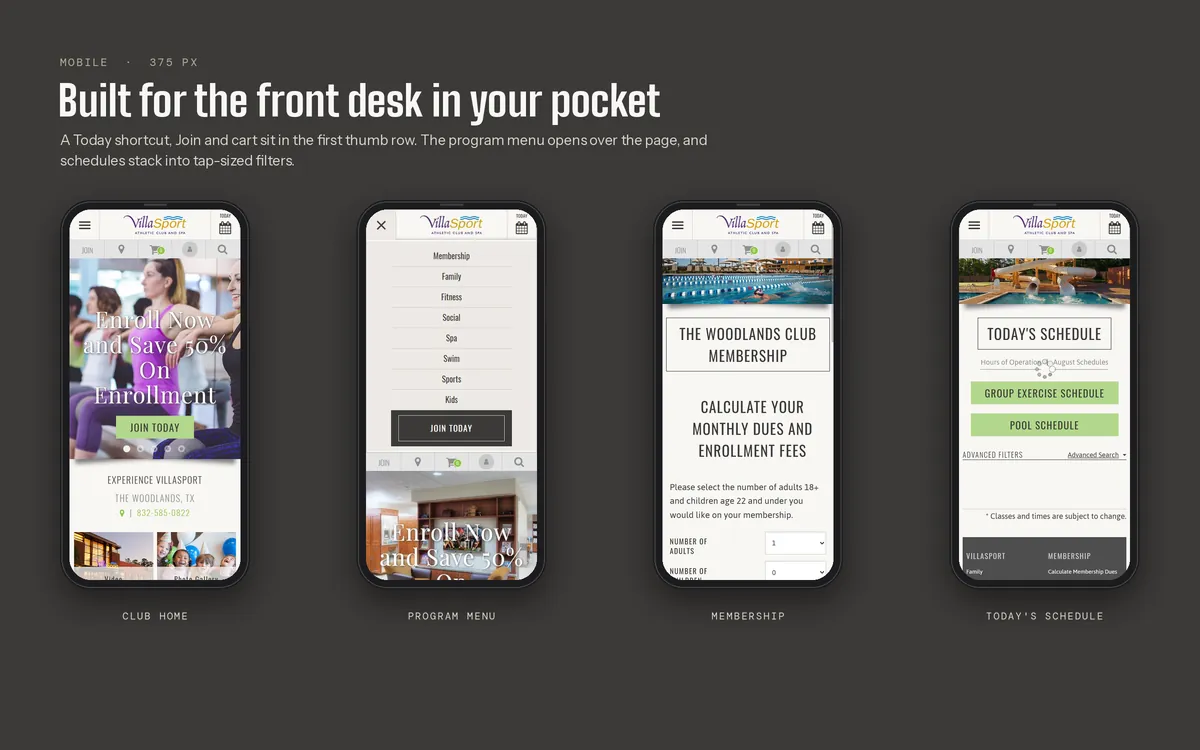
The Woodlands’ home page sets the tone at every size: a rotating “Enroll Now and Save 50% On Enrollment” hero, the program menu in a rail, and Today’s Schedule and Join Today always in reach. On a 375px phone the same offer, the same club and the same two actions stay in the first screen.
- RESPONSIVE
- LOCATION-AWARE
- JOIN TODAY
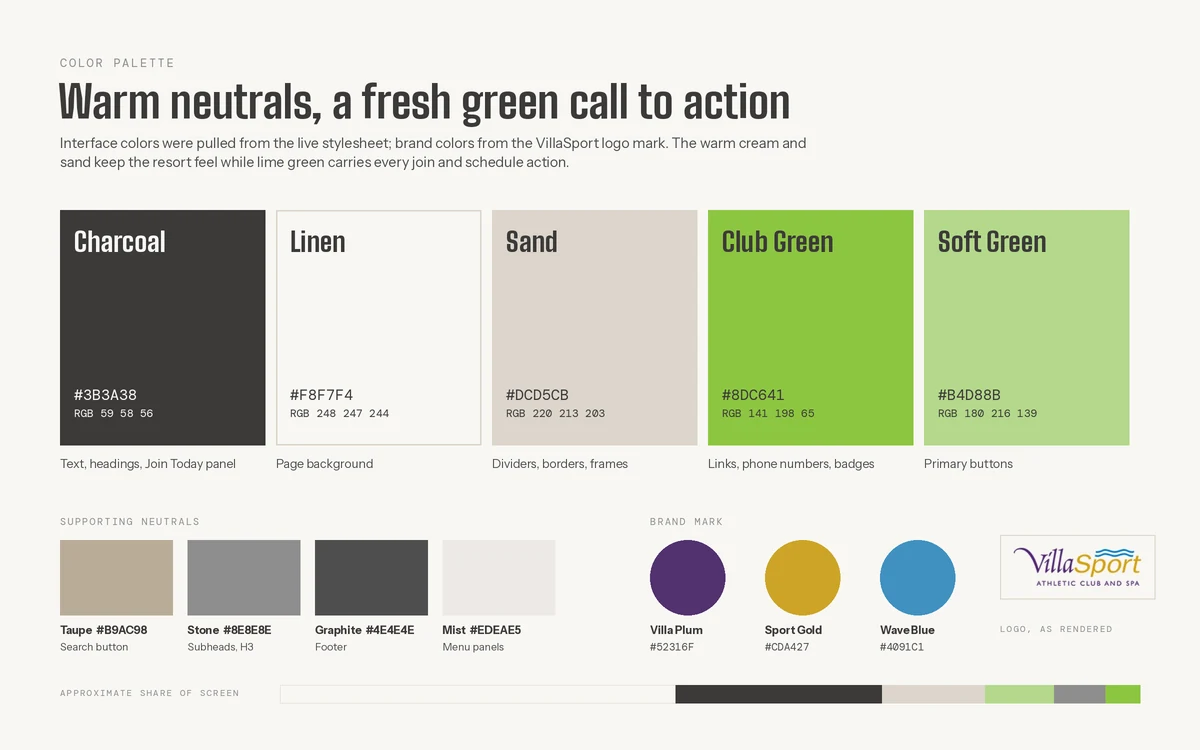
Warm neutrals, a fresh green call to action
Charcoal carries the text and headings, linen and sand keep the page warm and resort-like, and Club Green marks every join, schedule and phone number. Villa plum, sport gold and wave blue come from the logo mark and appear only in brand moments, so the lime green is always the action.
- WARM NEUTRALS
- CLUB GREEN
- LOGO COLORS
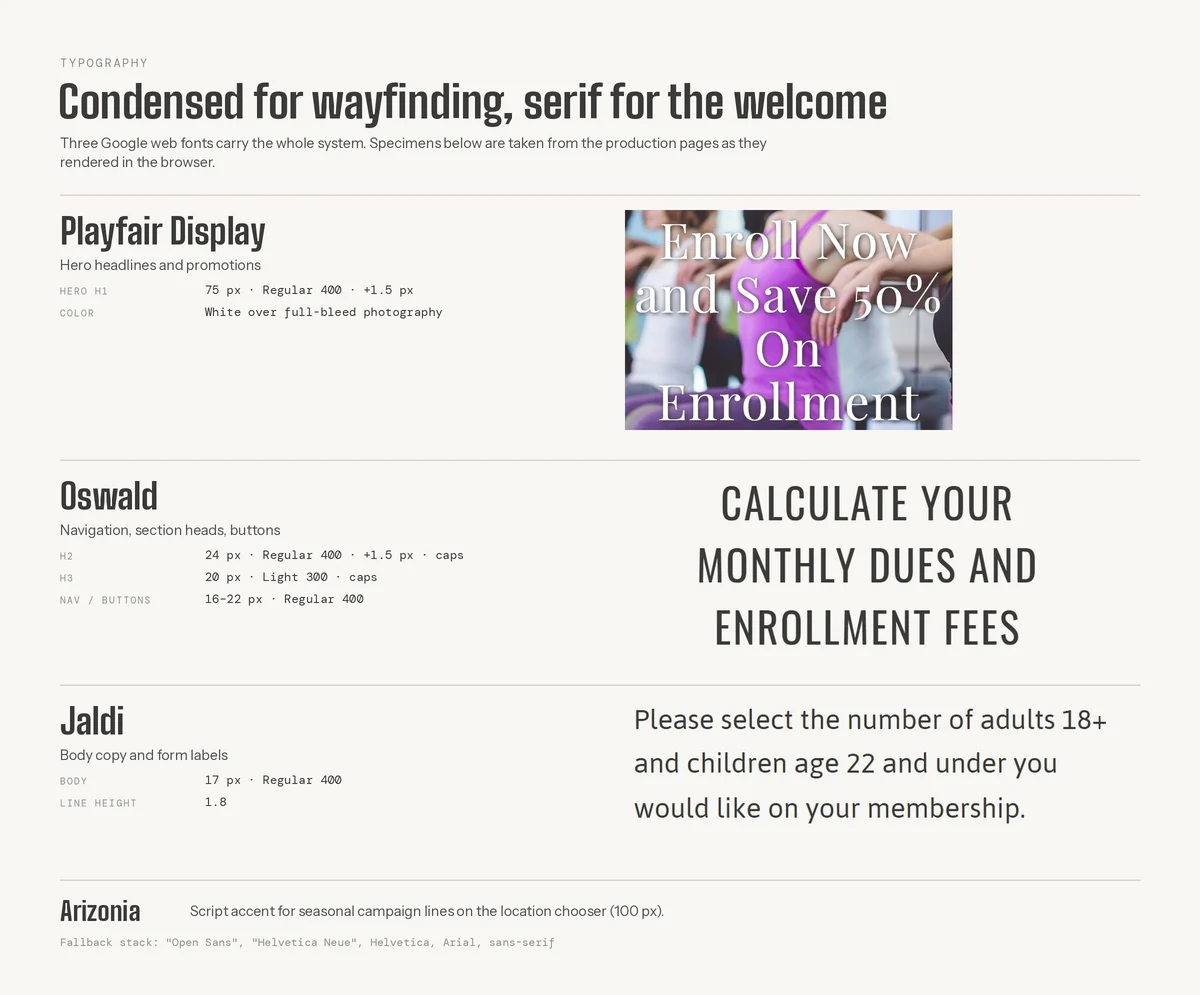
Condensed for wayfinding, serif for the welcome
Three web fonts carry the whole system. Oswald handles navigation, section heads and buttons, so the menus are quick to scan. Playfair Display sets the hero promotions in white over photography. Jaldi carries body copy and form labels at 17px with 1.8 line height, which keeps the membership questions easy to read.
- OSWALD
- PLAYFAIR DISPLAY
- JALDI
CHAPTER 03 OF 03
Designed around the front desk
Most of the effort went into how the clubs sign up members and fill classes, before anything was drawn.
09 · UI / UX PROCESS
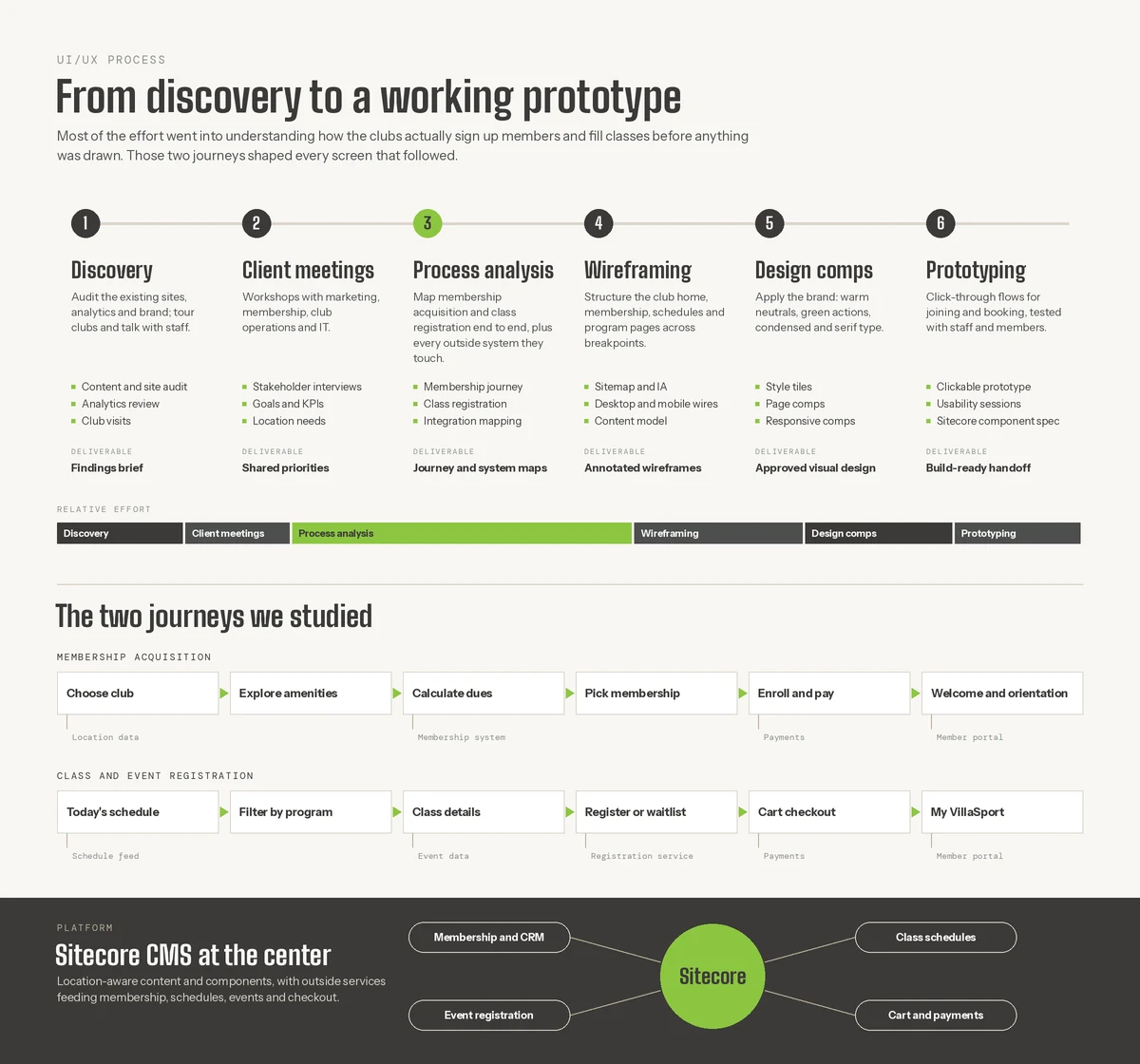
From discovery to a working prototype
Most of the effort went into understanding how the clubs sign up members and fill classes before anything was drawn. Six steps followed: discovery, client meetings, process analysis, wireframing, design comps and a clickable prototype. Two journeys shaped every screen: membership acquisition, from choosing a club to the welcome, and class and event registration, from today’s schedule to My VillaSport. Sitecore sits at the center, with membership and CRM, class schedules, event registration and cart and payments connected around it.
- DISCOVERY
- TWO JOURNEYS
- SITECORE AT THE CENTER
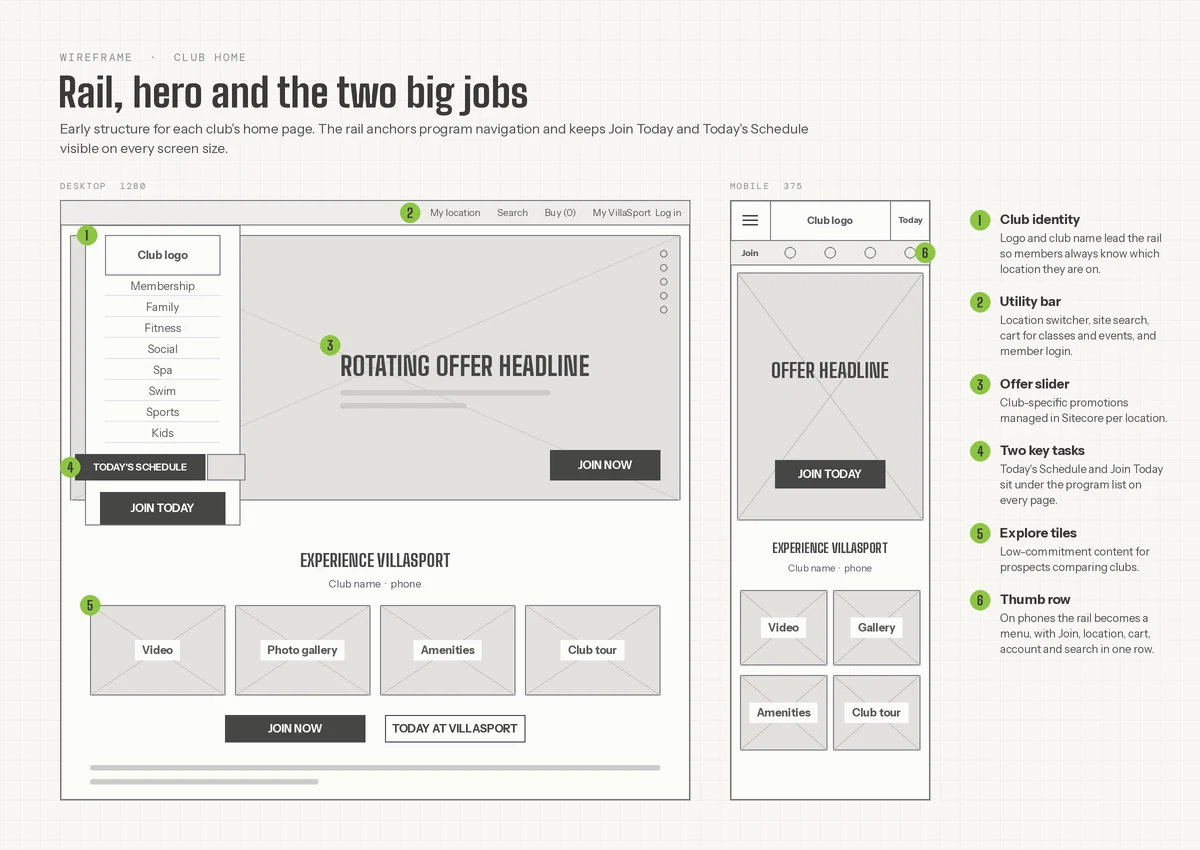
10 · WIREFRAME · CLUB HOME
Rail, hero and the two big jobs
Early structure for each club’s home page. The rail anchors the program navigation and keeps Join Today and Today’s Schedule visible on every screen size. On a phone the rail becomes a menu, with Join, location, cart, account and search in one row, and the offer slider is managed in Sitecore for each location.
- WIREFRAME
- PROGRAM RAIL
- THUMB ROW
13 · INFORMATION ARCHITECTURE
The sitemap of villasport.com
The animated sitemap lays out the club pages, the program areas and the membership and schedule flows, so the structure of every location can be checked in one view.
- SITEMAP
- INFORMATION ARCHITECTURE

THE OUTCOME
Joining feels like a conversation at the front desk.
VillaSport’s Sitecore site gives every club its own home page, shows the day’s schedule and lets prospects price their membership and join online in a few questions, before they ever speak to sales.
- PROGRAM AREAS IN THE RAIL
- 8
- STEPS TO JOIN ONLINE
- 4
- WEB FONTS IN THE WHOLE SYSTEM
- 3
- 01
Price before the pitch
The dues calculator shows monthly dues and the enrollment fee up front.
- 02
Mapped from the desk
The online join flow follows the clubs’ in-person sales process.
- 03
Today, always in reach
Today’s Schedule and Join Today stay in the rail on every screen size.
NEXT STEP
Selling memberships online?
We build member-facing sites that sell, schedule and serve from one platform. Start with how your members join and book, and the rest of the site follows from that.